

What are Instagram Stories?
Instagram Stories is a way of sharing a photo or video with your followers that will disappear after 24 hours. Instagram Stories became available in August 2016 and added the disappearing content feature that has been popular Snapchat.
History
Instagram is a social network used by people who post photos and videos they take using their smartphones. With the photo and video images as the focus, Instagram is a visual social network, and the content usually has very little text. When using Instagram, people open the Instagram app on their smartphone (Apple iOS and Android apps are equal in functionality) take a picture or video (videos can be from 3 to 60 seconds long) and share the image with any text for the caption.
After you share an image or video, the post appears in your profile history and is shared by Instagram to the feed of people who follow you. Posts of photos and videos are public and can be viewed and shared by any user on Instagram. It's possible for you to go to someone's profile and see their post history from their profile and anyone can view your posts when viewing your profile.
When you look at the posted images from users you follow, they appear on your smartphone screen. These public visuals are considered the Instagram “feed.” Stories are different from posts, so let's see how.
Story versus post
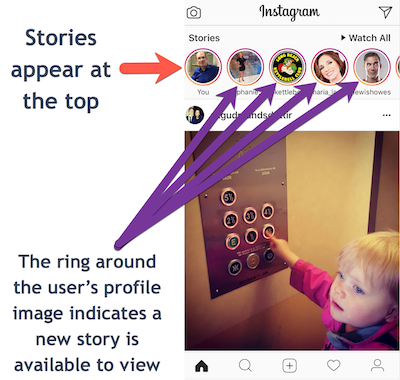
An Instagram Story is different from a post primarily because it disappears after 24 hours. The layout of the Instagram app displays several options to see stories from users you follow. These include a colorful ring around your profile picture, so users can tap on your profile picture and see your story. When you post a story, your profile image appears at the top of your follower's feed page and by tapping on your profile picture they can see your story. And when you share any post and have an active story, your profile image will have a colorful ring around it which people can tap to view your current stories.
Stories appear more prominently to your followers for all of these reasons and are valuable if you want to be more visible to your followers. You'll be able to tell if someone on Instagram has seen your story and they know if you've seen their story.
How to create and share a Story
To create a story in your Instagram app tap the camera icon or swipe from left to right on your screen in the Feed view (the view that shows posts from users you follow). Then tap the shutter button icon to take a photo or hold it to record a video. After you take the photo or video you are given options to enhance it; then you choose next to share it as a story with everyone on Instagram or to share it with specific followers.
Story options
Since it's the introduction, the Stories feature has added several options and enhancements. The options below are current as of the date of this article but expect more to be added in the future since these image options are popular with users.
There are options for recording different types of videos and options to add enhancements to your photo or video. You select the video options with a swipe to select the camera mode and the enhancement options by tapping a button or with a swipe across your image to apply a filter.
The different types of video recording options include:
- Normal: records standard video
- Boomerang: records a burst of photos that playback as a video forward or backward
- Rewind: Plays a recorded video in reverse when viewed
- Hands-free: records video without the need to hold the record button
After taking a picture or recording a video, some additional options are available for you to use to enhance your story image:
- Draw: a pen icon to draw on your photo or video
- Text: an icon for adding text
- Sticker: add a sticker which includes hundreds of colorful images and graphics and emoji
- Filter: swipe from left to right or right to left to add a filter to the image
Viewing a Story
To see a Story from someone you follow, look for their profile image and if it has a colorful ring around it. The colorful ring is the indicator that they have published a story and it's available for you to view. Just tap on their image, and you'll see their story and Instagram will playback all the stories that account has published in the past 24 hours. You can tap to go back or forward in stories, but there are no likes or commenting on stories.
Why use Instagram Stories?
Publishing a story makes your profile image appear at the top of the Instagram app to any of your followers, so you are more prominent when they open the app. Stories also have a time-limit and are only available for 24 hours, so followers will need to open the app and check to see if there are stories to view at least once a day or risk missing something.
The 24-hour availability of content is one of the reasons SnapChat became popular, and by introducing the feature, Instagram is trying to keep users from leaving and attract users who might have lost interest in using the social media app. From all indications in the marketplace, their approach seems to be working and has made Instagram more popular than ever.
To my way of thinking
Instagram has always been a highly visual social network with the ability to connect people together and discover images and videos. With Instagram Stories, there's a new feature to share content with specific individuals and for a limited time that was previously only available on Snapchat. The combination of public and private content sharing gives users more control over their content and who they share it with than ever before, along with the ability to discover public posts. If you haven't used Instagram, try it out and if you haven't used it for a while, try out Stories.
Here's a helpful link to Instagram's help page on Stories: Instagram Help
Not a subscriber? Don't miss a single issue: