

What is Pinterest?
Pinterest s a social networking site on the internet. Pinterest can be used with any Web browser and also offers apps for smartphones and tablets.
What do you do on Pinterest?
Using Pinterest is a bit like using a bulletin board to save your favorite pictures from all of the magazines that you read. When you sign up for Pinterest, you receive a free account with online "inboards" on which you can "pin" pictures from webpages. Your account, as well as everyone else's, is a collection of images pinned on these electronic bulletin boards. You can view anyone's boards, and your boards can be viewed by anyone other users on Pinterest.
Your activity on Pinterest consists of "pinning" images on your boards and following other Pinterest accounts to see what they've pinned.
Pins and Boards
Using Pinterest, you can click "Pin It" on an image. This image can be on someone else's Pinterest pinboard, or it may be from the web. This moves it to your personal Pinterest site. When a pin is entered into the Pinterest system, it always links back to the webpage for the original image. This way, someone browsing a pinboard can always view the image and the webpage where it was originally published.
Within Pinterest, a user can create numerous collections by creating a board on a topic. Topics tend to center on home, fashion, style, crafts, children, cooking, books, and travel. So far the majority of users are women. One pinboard may be titled "favorite home projects", featuring pictures of interesting decor, furniture, wallpapers, and accessories. Another may be 'Yard Ideas' featuring lawn and garden photos. Still, another may be "Favorite Crafts For Kids'. The title and its content are up to the user.
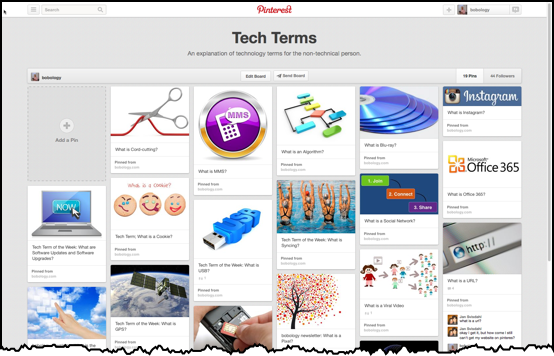
Here's an example of my pinboard of the Tech Term of the Week:
Connecting with other Pinterest users.
Like other social networks, users can connect with each other and keep up to date on activity. By following another user, you can receive updates when they pin new images, and likewise, others can follow you and receive updates when you pin new images. To make it easier to find images that you like, a heart icon is located on each image. Click on this icon to like that image, and it's added to your list of liked images in your account. Of course, you can also "repin" any image to one of your boards.
A user can search Pinterest for pinboards on a particular subject. For instance, an avid reader might look for a book recommendation board. The family cook may sign up for many different recipe pinboards. In this way, Pinterest makes it easy and safe to find exactly what a person seeks without running into very much clutter. People of similar tastes or similar hobbies can find each other and share content safely. They can also store content safely. Since the images you're pinning come from public webpages, there's not much to be concerned about regarding the privacy of your pinned images.
Marketing with Pinterest.
Although most users are browsing for pictures, Pinterest pinboards are playing a role in commerce. Small online stores and artists of all kinds utilize this person-to-person system to get their products before the public. And large brand names use Pinterest to increase their social network visibility and encourage word-of-mouth marketing.
Why is it so popular?
Pictures and images are popular on the Web, and Pinterest makes it easy for anyone to create a free online collection of pictures and images. Pinterest has become a modern way to window-shop and browse collections of images created by both individuals and brands. Anyone can express their own interests by creating a board and pinning images. It's extremely easy to use and fun for a lot of people.
Not a subscriber? Don's miss a single week: