
Three Months with Apple Watch
Apple Watch is a computer on your wrist. For those of you who remember Dick Tracy's two-way wrist radio, it's now a reality, and you can make and receive phone calls and more on your wrist with this device. I've owned my Apple Watch for three months and thought I would share my experience and what I've found the Apple Watch can and can't do for a user.
The Apple Watch is designed to fit as a part Apple's product family of devices and online services. This means that if you own an Android phone and not an iPhone, you won't be able to use the watch for very much since it's necessary to use an iPhone with your Apple Watch for most functions. Your iPhone received an app in a recent iOS operating system update that added the Apple Watch app to your iPhone.
The Apple Watch App
The Apple Watch app on your iPhone is how you manage the settings for the apps that run on your watch, such as when an app displays a notification, not the watch. The Apple Watch app on your iPhone also provides a backup of all of your Apple Watch settings.
My Repair
I recently had to take my Apple Watch in for repair to an Apple Store. The Digital Crown functions as a button when pressed, and it didn't push in normally to access the home screen. In addition, when rotating the crown to scroll up and down it seemed a little sticky. I learned that the it's possible to rinse the watch under running water for 10-15 seconds to clear small bits of dirt that might get into the Digital Crown. While not waterproof, the Apple Watch is very water-resistant.
The Apple Genius tech said that while the Digital Crown rotated much more smoothly now the press-button function still wasn't working, and we needed to send the Apple Watch in for repair. He also said it was the first time they had to send one in for repair out of that store, which is a good sign of the product reliability. I wear my Apple Watch every day during workouts, gardening, and other activities, so it sees a lot of activities. The fact that I miss having it on my wrist is why I decided to write this commentary.
The Apple Watch is covered by a 90-day phone support and one-year hardware warranty, but I purchase Apple Care for all of my products and have a two-year phone and hardware support plan. Something I recommend to all of my students since the Apple Care often includes some benefit for loss or damage replacement.
What I Miss Most
What I found I missed the most was the convenience of having many of the iPhone functions available on my wrist. For me, taking an iPhone out of a pocket doesn't seem that difficult but it can be distracting, and it's been convenient having many iPhone functions on my wrist. The biggest benefit has been the quick and easy ability to check an incoming text message, important email, or upcoming calendar appointment with just a glance on my wrist. If this convenience is worth the cost is a personal decision, so why the Apple Watch is not an essential device, it definitely offers significant convenience.
About the hardware
The Apple Watch will hold up to a 48-hour charge, and I haven't run out of battery charge during a 24 hour period ever in the past three months. I charge it every evening by placing on the included charging pad that came with the Apple Watch. The Apple Watch comes in two sizes, and I chose the larger after trying on both sizes on in the Apple Store. You can schedule a fitting to see what the Apple Watch looks like in both sizes and different case finishes and with different bands. It's easy to order a different band, and they use a simple but very secure connection that makes it easy to change the band for replacement or simply for styling.
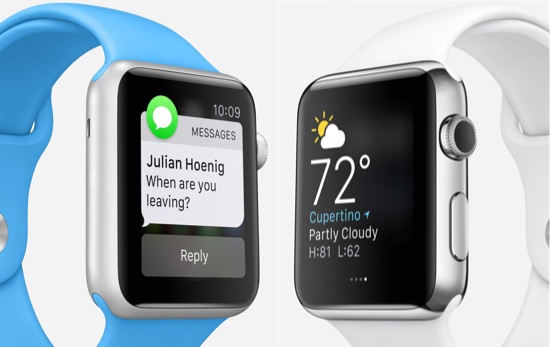
The Apple Watch includes both a microphone and speaker and it's possible to make and receive phone calls, record messages, and even make requests to Siri. The Digital Crown (the part that wasn't working on my Apple Watch) is both a push button and a rotating scroll control. Press the Digital Crown in and it brings up the app screen where you can tap and access any app on your device. Another button gives you access to contacts and other functions.
The screen is a touch screen, so it responds to gestures such a tap and swipe, but it is also pressure sensitive and will respond to pressure. The pressure feature is used to stop an app like the workout app (standard with the Apple Watch) and brings up screen buttons. While not confirmed, it's suspected by many analysts that the next generation iPhone will include this pressure sensitive screen.
On the back of the Apple Watch are some sensors and a vibration device called the Taptic Engine. The sensors use green LED lights paired with light-sensors to detect the amount of blood flowing through your wrists. When blood flows through your wrist more green light is absorbed when your blood pulses, and less between each beat. The Apple Watch measures your heart rate continuously when using the Workout app. Another sensor uses infrared light to measure your heartbeat throughout the day at intervals.
The Taptic Engine is a small device called a linear actuator. Using this technology your Apple Watch can tap you on the wrist with a small vibration. When you receive an alert such as a text message or other notification you'll receive a tap on your wrist, or if you use the Maps app for navigation, your Apple Watch will tap you while your iPhone tells you to make an upcoming turn. During map navigation, your Apple Watch also displays the turn-by-turn navigation steps on it's display.
The Apple Watch includes a GPS chip for measuring location and calculating distance and an Accelerometer to help measure total body movement, counting steps, and wake the watch up to light up the screen automatically when you rotate your wrist to glance at it.
The screen is bright and responsive to touchscreen gestures and offers convenient ways to view apps quickly with a swipe up and a swipe right or left. The Apple Watch has no WiFi or stand-alone Internet capability. Apple Watch uses Bluetooth to connect with an iPhone and then uses the iPhone's Internet connection if needed.
Apps
The most valuable apps for me seem to be the ones that have eliminated the need for me to look at my iPhone. These uses include viewing and replying to text messages, viewing emails from important contacts (only emails from your favorite contacts appear on the watch to minimize interruptions), the helpful taps for map navigation, alerts for appointments, and Apple Pay. Apple Pay is Apple's payment system that allows you to use your Apple Watch or iPhone 6 to pay at most credit card terminals just using your credit card information stored with Apple.
Giving voice commands using SIRI with the Apple Watch in my experience so far isn't as accurate and reliable as using SIRI on the iPhone and Apple says there will be improvements in the next update of the Apple Watch operating system. This type of product improvement with software updates is normal for any software related technology and is one of the benefits of free updates from Apple. I have been able to dictate text messages however, and SIRI was pretty good as transcribing voice to text for me.
Many third-party apps have or are developing Apple Watch features. The functionality of any app on the Apple Watch depends on how the app developer provided the app to Apple. Apple supplied apps seem to be the ones to make the most use of the Apple Watch without the iPhone and there's a reason for this. Apple's original software development tools for the Apple Watch didn't give third-party app developers access to all of the Apple Watch functions, which included the ability for an app to work without the need to communicate with an iPhone. Apple Pay is an example of this capability.
There's a lot more things you can do with apps on an Apple Watch such as storing your favorite photos on your watch and using the watch as a remote control for your iPhone camera. I can't cover all of these since you really do have a computer on your wrist. I recommend viewing some of the videos and information on Apple's website for the most up-to-date information.
http://www.apple.com/watch/built-in-apps/
To my way of thinking
While not essential, the Apple Watch is definitely a convenience. For me, any technology should make life simpler and easier, and my Apple Watch has accomplished that. Apple is preparing to ship the next version of the Apple Watch operating system in Fall 2015, which will include even more functionality and flexibility than the current version. Third-party app developers will be able to access and use all of the features of the Apple Watch and will be developing apps that can work without a connection to an iPhone.