
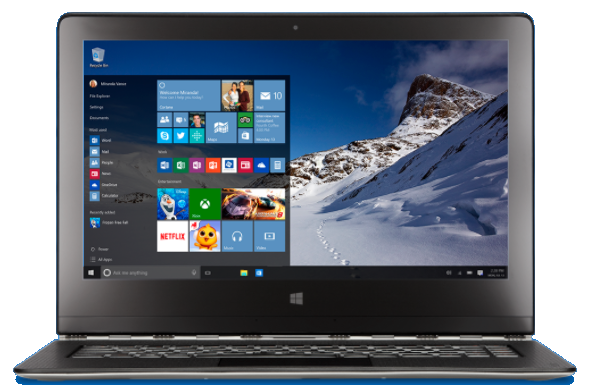
What is Windows 10?
Windows 10 is Microsoft's latest version of the Windows operating system for personal computers, tablets, and smartphones. It will be available to the general public on July 29, 2015, and is a free upgrade for users of Windows 7 and Windows 8.
What's at stake for Microsoft
When Microsoft released Windows 8, the company tried to bring features of touch screen computing to the desktop and use a similar screen across all operating systems for Windows versions for the desktop, laptop, tablets, and smartphones. Microsoft was going to leverage the Windows customer base and partners (technical professionals with Microsoft certifications) from the desktop to attack the mobile marketplace. By designing an operating system that worked similarly from the desktop to the smartphone, Microsoft was hoping to get Windows desktop users to start buying Windows smartphones and tablets. Unfortunately, it has not been successful.
If you know anyone with a Microsoft Windows smartphone, you're the exception. Microsoft bought Nokia several years ago, deciding that it needed to gain ground against Apple and Android (Google) in the smartphone market. That purchase wasn't helpful to seeing more Windows phones.
But let's be realistic, people are using their smartphones more than their computers, so Microsoft made some management changes. The new management started to change direction from Windows 8 and prepared for Windows 10 (by the way Windows 9 is being skipped as a number; there was no Windows 9 operating system).
Many of the things people liked about Windows 7 are coming back into Windows 10, since may users of Windows 8 found it so different from Windows 7 or even Windows XP that it felt like using a new computer. Thus, Windows 10 is focused on the theme “it's familiar,” which appears on Microsofts official Windows 10 website.
What's different about Windows 10
First of all, an upgrade from Windows 7 and Windows 8 to Windows 10 is absolute free. All you need to do to quality is to upgrade before July 29, 2016, which is one year from the official release of Windows 10. If you use Windows 7 or Windows 8, a small Windows icon should appear on the lower right of your screen in the taskbar. Click on the Windows icon and you should see information on how to reserve your upgrade.
In addition to being free, here are some of the main features of Windows 10
- Brings back the familiar Start menu that was removed in Windows 8
- Uses a new Internet Browser for viewing web pages called Microsoft Edge
- Allows four apps to snap into place on your desktop and create “virtual' desktops
- Integrates with the Windows Store for app and content purchases
- Introduces Cortana, a personal assistant that learns about you and how you work
- Includes apps like Maps, Photos, Mail & Calendar, Music and Video
- Includes Microsoft Defender anti-virus software standard
- Makes it easy to save all of your files and data in Microsoft's OneDrive cloud service
Let's take a closer look at the most significant new features.
Start Menu
The Start menu was removed from the desktop screen in Windows 8 making it difficult for many people to understand how to find a locate familiar menu items like apps and folders. Windows 10 brings back the Start menu to the desktop so you can use your familiar way of navigating or offers the option to use desktop icons.
Windows Edge
Windows Edge makes web browsing much easier on Windows. Internet Explorer came from Windows XP, and the web has changed a lot, and the web browser has become one of the primary apps we use daily. Edge has a feature that allows you to write on web pages you view with a stylus or type notes on the page, then save the page for later reference or to email to someone. A “reader” view is available that displays only the readable text on a web page for easier distraction-free reading, and Cortana, the personal assistant, is integrated with Microsoft Edge so you can use voice commands to search the web or other web browsing actions.
Windows Store
Like Apple and Google, Microsoft is now using a store on it's computers, tablets, and smartphones to users can install and purchase apps and content like movies, games and TV shows. Your purchases are stored by Microsoft using your Microsoft account, which you create when you install Windows 10. Purchasing and installing apps and content from the Windows store helps make installation safer and easier since Microsoft checks all the apps available from the store.
Cortana
Your personal assistant, Cortana, helps you by keeping track of your activity, like appointments and reminders, and will help create reminders automatically for you if you let it. For example, if you're using the calendar on your desktop, Cortana can remind you when to get ready to leave for an appointment and how long it will take to drive there. Cortana brings an artificial intelligence based personal assistant to Windows users who will be able to talk to their computer and use verbal instructions.
Windows OneDrive
Microsoft provides 15 gigabytes of free cloud storage service with their OneDrive cloud storage You can use this for storage of your documents, files, photos, and more. By using OneDrive for storing your documents and files, they are available to you from your OneDrive account on any Windows device you own and by using your OneDrive web account on any computer. Microsoft even has OneDrive apps for Apple and Android devices.
There are ways to increase your free storage capacity. For example, using OneDrive to store your photos will give you an extra 15 GB, and referring a friend who signs up will give you an extra 500MB. One terabyte of storage is included with a subscription to Office 365, which Microsoft's Office products (Word, Excel, PowerPoint, Outlook, Notes, etc.).
In case you were wondering, I already subscribe to Office 365 using a Home and Family plan, so five members of my family each can use Office and each receives 1 TB of personal OneDrive Storage. The Home and Family plan is the best deal at under $10 a month for all five users.
To my way of thinking
Whether or not you use Windows, Microsoft still has a big impact on the whole technology industry. When Microsoft does something like introduce a new Windows version, Apple, Google, Facebook and other technology companies all take notice.
Should you upgrade? Yes.
Windows 10 is much easier to use for people who struggles with the change from Windows XP or Windows 7 to Windows 8, and using Windows 10 will seem much more familiar. Windows 10 is more secure, with Microsoft Defender security software built-in, but if you already have a third-party security software installed Windows 10 will use your existing software.
Windows 10 has also been in use by millions of users during the development and test period. As a result, many bugs have been eliminated making it more reliable for the July 29th release. Microsoft used a new program called Windows Insider which allowed consumers the opportunity to participate in the development of Windows 10.
Not a subscriber? Don't miss a single issue: