
Pay-Per-Click Advertising - Clicks, Traffic,-and-Conversion
Clicks and Traffic
When a web user sees your ad, and she “clicks” on the link in your ad, this is considered a click event. With PPC ads, you pay a fee for each click event that takes place. Google tracks clicks and charges your AdWords account. At this point Google has done what it said it would do for you.
When a user clicks on the ad, it's often called a click-through, since he is going through your ad to another web page. The click-through-rate, or CTR, is the number of times users click on the ad compared to the number of impressions. Think of your ad like a sign outside your business that makes it clear what you are offering to customers. People who see your ad are like people who see a storefront, and those who click are like people to stop to look at displays or walk-in.
Impressions
You choose specific keywords (single words or multiple word phrases) that, when searched by a user on Google, will result in your ad appearing in the search results. This is called an impression and is useful for doing ad analysis. Google keeps track of the number of your impressions. Your ad will appear either in the top or right portion of the search results, the area of the results page that Google reserves for PPC.
Above the Fold or Scroll Bar
Above the fold is a design and layout concept from print media and newspapers. If you have ever bought a newspaper, you know that the paper is typically folded in half. The portion of the newspaper that appears in display racks and newsstands is the half that is “above the fold.” Important news stories with headlines, and articles that will capture reader's attention are placed above the fold where they can be seen on display, to sell newspapers.
Web pages have a similar layout concept, which is the portion of any web page that appears above the scrollbar in a browser. Portions of a web page appear at the top, and to see the rest might require a visitor to scroll down. Google's search engine results page has an area that's “above the scroll bar” and the rest of the content requires scrolling. Ads which don't appear in the top portion of a web page above the scroll bar aren't effective. Google generally displays PPC ads at the top of the search results, but the number will depend on the size of the user's screen. Smartphones display only a one or two ads in search results.
Any ad that is isn't above the scroll bar will not be visible unless the user scrolls through the page. Since very few people do this in practice, your ad may get an impression, but never be seen by anyone.
PPC Placement and Quality Score
The placement and order of the ads on the search-results page is not only based on who is willing to pay the most for a click but also the Quality Score for your ad, as determined by Google.
The quality score is determined by:
- the historical click-through rate (CTR) of the particular keyword
- the historical CTR of all the ads and keywords in your account
- the quality of your landing page, the page of your website that your ad links to
- the relevance of the keyword to the ads in its ad group
- other relevance factors (which Google keeps secret)
Ads with higher Quality Scores will be able to pay less per click and appear higher than ads with lower Quality Scores. Basically, Google is going to display ads that generate more clicks, and therefore more revenue for Google, more often than ads that generate less revenue.
This means that bidding price alone doesn't determine the ranking in which your ad appears. Good ad copy, which encourages clicks, along with a relevant landing page will increase the ranking of your ad and results in more impressions, which creates more clicks. A higher Quality Score works to reduce your PPC bid prices since you are not replying on bid price alone to achieve higher ranking.
Ad Copy
If you aren't a good writer, get help from a copywriter or editor. You don't have much space to write your headline and description. You want to maximize your number of clicks per impressions and also get the right people clicking through on your ad. Here are some tips for ad copy in PPC ads:
- Create simple, easy to read ads.
- You only have a few seconds to grab someone's attention on the web. Be sure you have a message that is as unique as possible and offers a real benefit.
- Include any discounts, prices and promotions.
- The more information the better. Having a price in an ad is an excellent way to qualify prospects. If your services require a minimum-size organization or investment, use that information to pre-qualify your prospects. Discounts, free offers, and other incentives work, but be sure your description targets the right audience.
- Include benefits in your description.
- People want benefits. A benefit is the result that people receive from using your products or services, like good health, reduced costs, weight loss, or increased sales.
- Use a specific, clear call-to-action.
- Your ad should include the call-to-action. The call-to-action encourages users to click on your ad and helps them understand exactly what you expect them to do when they reach your landing page. Be specific!
- Include one of your keywords in your ad copy.
- Find the best performing keyword in your ad group and include it in your ad text, especially in the title. Whenever a user enters that keyword for search and sees your ad, the keyword will appear in bold font within your ad on Google. This draws the user's attention to your ad and helps show users that your ad relates to their search.
- Choose the best destination URL, usually a landing page.
- Review the website you're advertising and find the specific page that has the information or product described in your ad. If necessary, create a specific landing page for your ad campaign.
- Test multiple ads in each ad group.
- Experiment with different offers, wording, and call-to-action phrases to see what's most effective for your advertising goals. Google will automatically rotate multiple ads in a campaign and show the best performing ad more often. You can then refine your ads and continue to improve them to receive the best results possible.
Managing PPC Costs
Researching keywords is important in managing advertising costs and the research can have a significant payoff. Using keyword search phrases that are more unique to your business and ad can help you avoid the competition for high-priced keywords. Using Google's extended advertising network and sites, which are generally lower in cost, finding specialized websites for your ads, and targeting your ads for specific geographic areas can make your ad campaign more cost-efficient.
Conversions
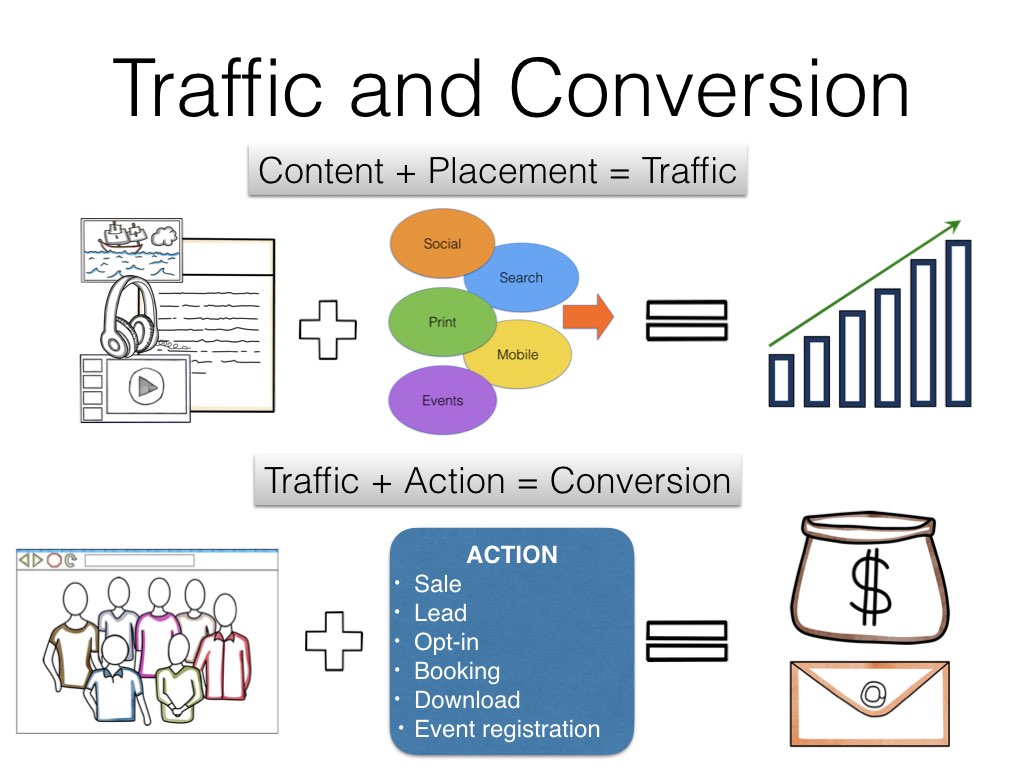
It's not good business sense to pay for PPC ads and not get results from them. When a web user clicks on your ad, the web page that he goes to is your responsibility. Getting the results you want from the PPC ad is called a conversion.
So if you want a conversion, ask yourself what you want the web user to do when he gets to your website. This is where many new advertisers using PPC make the mistake of taking a web user to the home page of their website. It may be a nice place to visit, but does it really tell the web user what action to take? Usually not.
Effective conversion requires a specific call-to-action. This call-to-action can be a number of things, depending on what results you want from your PPC ad campaign. Examples of calls-to-action include:
- Purchase a product or service
- Sign up for an email newsletter
- Complete an inquiry form for a sales person to call
- Obtain a coupon
- Complete a survey and collect customer information
- Obtain a free sample or download after completing a form
- Enter a contest
These are some samples of calls-to-action and are specific tasks that you, the advertiser, want a web user to complete after she clicks on your ad. Your home page probably doesn't make this clear when the web user sees it. What you need is a special web page that works with your ad. This is called a landing page.